¶ GPS Tracking update frequency
¶ Summary
Here is a summarised version of when and how often your GPS tracker will check in:
| Status | Vehicle type | Check in frequency |
|---|---|---|
| When driving |
|
Every 60 seconds. |
| When parked |
|
Once every 15 minutes |
| Motorcycle | Every 8 hours, to save vehicle battery | |
| Caravan | Every four hours | |
| In response to “Real Time Tracking” requests. | All | Every 10 seconds for 10 minutes. |

Immediate check ins!
In addition to the regular check in periods, your GPS tracker will immediately update its location with our servers whenever any of the following happens. These events may also result in a Notification or Alarm notification being sent to your phone.
| Event | Details | Availability |
|---|---|---|
| When using “Request Latest Position” | Every ImmoTrack customer can ask their GPS tracker to provide its current position. | All trackers! |
| Responding to a command | All GPS trackers from ImmoTrack Online support commands. When you send a command to your tracker, it will respond immediately. | |
| Accident Detected | If the vehicle crashes (based on impact G-Forces). | |
| Unauthorised Movement | Also called “Auto Geofence”, this alarm will trigger if the vehicle is moved more than 100 metres with the engine not running. | |
| Voltage Drop detected | If the vehicle battery drops below 10 volts | |
| Power Cut | If the power to the GPS tracker is cut or if the vehicle battery is disconnected. | |
| Low GPS battery | If the GPS tracker battery is going flat | |
| GPS or 4G Jamming | If the GPS signal or 4G signal is detected as being jammed | |
| Towing Alarm | If the vehicle is being jacked up in a towing attempt | ImmoTrack Essentials + ImmoTrack Secure |
| Ignition turned ON | Only GPS trackers with ignition detection can notify when the ignition is turned on or off. | |
| Ignition turned OFF | ||
| Vehicle Disabled | When the vehicle immobiliser is used. | ImmoTrack Secure |
| Vehicle Activated |
¶ Details of GPS check-in frequency
Your Vehicle will generally be online all the time unless forced to disconnect by the mobile network. When Online, your GPS Tracker will check in and send its latest position data and status on a regular basis, based on its current state.
All GPS trackers have two states:
- Moving
- Not Moving
The following table shows how often your vehicle will update its position based on what state it is in:
| Vehicle State | Vehicle Type | Check-in frequency | Notes and Reasoning for Check-in frequency |
|---|---|---|---|
| Moving |
|
Every 60 seconds if 3 GPS tracks have been collected |
All vehicle types that are driven on roads use the same tracking settings when in motion. A “GPS track" is a request for a collection of GPS data based on:
If three GPS tracks have not been collected in a 60 second period, the GPS tracker will check again 60 seconds later. |
| Heavy Equipment | Every 5 minutes |
Heavy equipment, which is generally towed to and from sites on trailers does not need to check in constantly when working on a site. Every 5 minutes, the GPS tracker will check in to send its GPS track data. GPS Tracks for heavy equipment are collected based on:
Using these settings, heavy equipment will always check in every 5 minutes, as there will always have been at least one GPS track collected in that time period. |
|
| Parked (Not Moving) |
|
Every 15 minutes | When not moving and with the Ignition OFF, the GPS tracker will check in every 15 minutes. |
| Motorcycle | Every 8 hours |
Motorcycles go into “Deep Sleep” mode to reduce power consumption, due to the small size of the vehicle battery. The check in period is every 8 hours so you have the assurance that your tracker is still operating. The tracker will wake up as soon as movement is detected. Note that for Motorcycles, the Tracker cannot be woken up remotely; only movement will bring the Tracker out of its sleep mode. |
|
| Caravan | Every 4 hours | Caravans check in every 4 hours to reduce power consumption on the caravan battery. |
¶ Vehicles without a battery
Not all tracked vehicles have their own battery. Examples included trailers, and some small caravans.
For these vehicles, we recommend our ImmoTrack MAG GPS Tracker. This tracker has an in-built battery which lasts 3-5 years when configured appropriately.
To support a 3-5 year battery life, our ImmoTrack MAG trackers only check in with their GPS location at the following times:
- When Movement starts
- If the vehicle is still moving after two hours
- When Movement stops (parking)
- Every 48 hours
Lastly, the ImmoTrack MAG will also send a “hello” message once per week. This hello message attempts to collect no location data to save battery, but provides evidence that the tracker is still functional.
¶ Vehicle Status
Within ImmoTrack Online, the status of vehicles is used primarily for tracking when the vehicle last sent an update about its location.
¶ Connection States
GPS Trackers, when connected to our servers, can be marked as being in one of three connection states: Online, Offline, or Unknown.
| Status | Description | Our Translation | Status Colour |
|---|---|---|---|
| Online | Tracker is connected to the server. | There is an active connection between the Tracker and ImmoTrack servers. | Green |
| Sleeping | The tracker is sleeping |
The tracker is in a sleep state to save power, and will wake up when it is next time to send a record, or when the vehicle is moving.
The wake frequencies for parked vehicles which go to sleep are:
|
Green |
| Offline | Tracker is not currently communicating with the server. |
The GPS Tracker is not currently talking to the ImmoTrack Online servers, due to being disconnected by the mobile network. Mobile network operators may sometimes “tear down” connections from GPS trackers if the cell tower is congested. For cars and trucks, the tracker will attempt to reconnect within a few minutes unless out of range of a mobile signal or restricted from connecting due to contunued congestion on the cell tower. For motorcycles, caravans and ImmoTrack MAG (i.e., a tracker which is sleeping), the tracker will reconnect at its next check-in frequency interval. |
Red |
| Unknown | Our servers believe that the Tracker is connected, but it has not reported any data for a period of time. |
If a GPS Tracker stops communicating with the servers without disconnecting “gracefully”, it is marked as Unknown. This can happen if your GPS tracker suddenly loses mobile signal completely, such as:
GPS trackers are always automatically attempting to reconnect to the Internet. As soon as a signal is available and the tracker is not asleep (i.e., Caravans/motorbikes) it will reconnect and upload all stored GPS data. |
Grey |
¶ Connection State visibility
In our Mobile App or web portal, devices have their status shown by the text and the colour of the text next to the Vehicle Name.
Trackers which have an active connection have the word “Online” in green text. Trackers which have gracefully closed their connection to our servers are marked as “Sleeping” in green text.
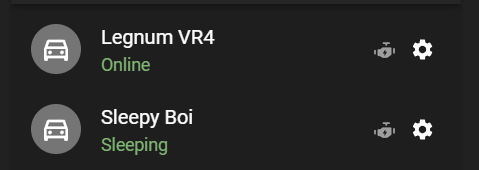
Trackers which have been forcibly disconnected by the mobile network have red text which shows the elapsed time since the Tracker last connected to the server.

Trackers who were believed to be online but have been silent for 10 minutes or more are in an “Unknown” state and have grey text which shows the elapsed time since the Tracker last connected to the server.

¶ How ImmoTrack Trackers connect to the servers
The GPS Trackers we use connect to our servers via the Internet using the 4G mobile network. Our Trackers connect to the Internet via 4G LTE and will seamlessly roam to Optus, Vodadone and Telstra.
ImmoTrack Online can provide Telstra-only long-range trackers on request. These tracker models use the dedicated Telstra LTE-M (Cat-M1) network and have up to 3x greater range over open ground compared to normal 4G LTE networks.